Installation
4 simple steps
- Install the game The original Dead Space (2008) from Steam.
- Download the installer Coming soon
-
Follow the installer instructions
The installer will do the following in detail:
- Tries to find your Dead Space install folder
- Removes every leftover of a previous mod version (if any)
- Lets the game use 4 GB of memory, which the high render resolutions need
- Installs the newest mod version
All you have to do is click Next.
- Start the game and play
Rendering
The second category of the mod menu. It holds the image shader and the render resolution.
Bindings
Here you can find the bindings for normal gameplay. Keep in mind that menus, the inventory, the store, the bench and save stations use their own layouts, which you will find out by yourself, I’m sure.
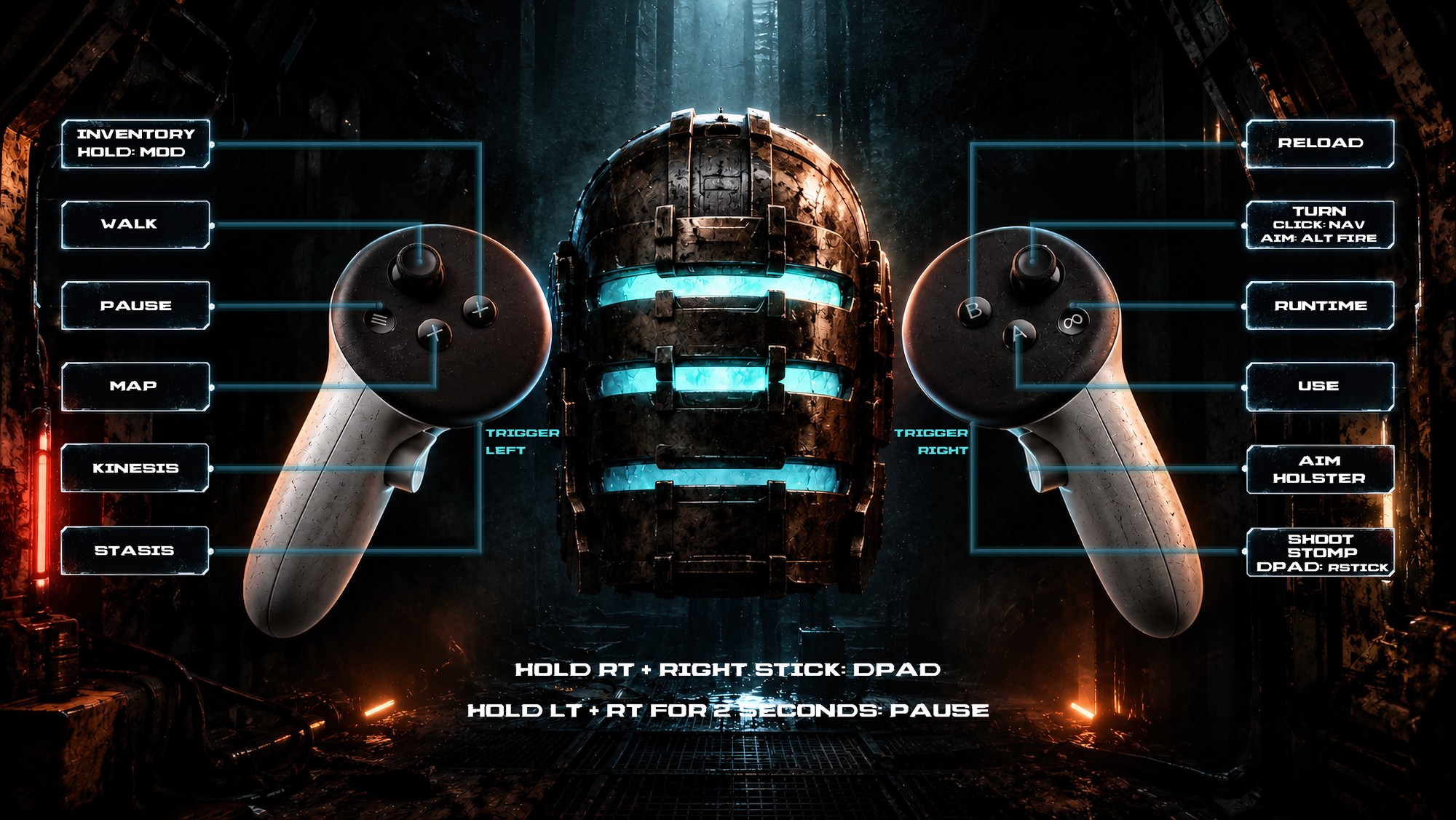
General bindings
- Hold left trigger, then let go
- Charge stasis in your palm and fire it on release — but don’t hold it too long, or it overcharges and fizzles out
- Hold left grip
- Kinesis tractor beam — grab objects, let go to drop them or pull the left trigger to throw them
- Touch your watch with your finger
- Open or close the inventory (empty hands only)
- Touch a hologram
- Open doors, use save stations, elevators, lockers, the store and the bench